---
title: Closing reason & Closing comment
description: Once you change the status of a case and mark it as closed, you are automatically requested to fill in a closing reason and a closing comment. This information is not visible to the sender and is only available to members of the administration.
---
[Skip to content](https://support.faceup.com/closing-reason-and-comment#main-content)
- [English](https://support.faceup.com/closing-reason-and-comment)
- [Čeština](https://support.faceup.com/cs/duvod-a-komentar-k-uzavreni)
English
Show submenu for translations
[Contact Support](https://support.faceup.com/kb-tickets/new?hsLang=en)
[](https://www.faceup.com/en)
- [Help center](https://support.faceup.com/en)
- [System status](https://status.faceup.com/)
- [Trust Center](https://trust.faceup.com/)
Open main navigation
Close main navigation
- [Help center](https://support.faceup.com/en)
- [System status](https://status.faceup.com/)
- [Trust Center](https://trust.faceup.com/)
- - [English](https://support.faceup.com/closing-reason-and-comment)
- [Čeština](https://support.faceup.com/cs/duvod-a-komentar-k-uzavreni)
English
Show submenu for translations
- [Contact Support](https://support.faceup.com/kb-tickets/new)
- [Sign In](https://www.admin.faceup.com/)
[Sign In](https://www.admin.faceup.com/)
How can we help you?
- There are no suggestions because the search field is empty.
1. [FaceUp Help Center](https://support.faceup.com/?hsLang=en)
2. [Administration features](https://support.faceup.com/administration-features?hsLang=en)
3. [Managing cases](https://support.faceup.com/administration-features?hsLang=en#managing-cases)
# Closing reason & Closing comment
## When closing a case in FaceUp, you’re required to document the resolution with a structured closing reason and comment.
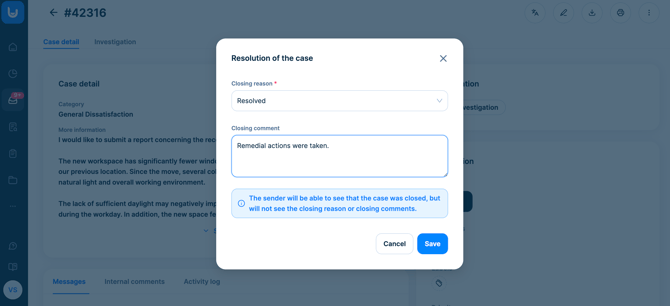
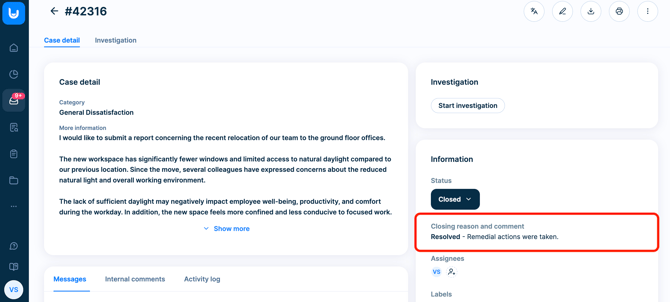
When you change a case status to **Closed**, FaceUp will automatically prompt you to fill in:
- **Closing reason**
- **Closing comment**
This step is mandatory and ensures your case documentation is complete, structured, and audit-ready.
Importantly, **this information is internal only**.
It is **not visible to the report sender** and can only be accessed by members of your FaceUp administration team.
Tip: You can define your own closing reasons or edit the existing ones - see the [Managing closing reasons](https://support.faceup.com/managing-closing-reasons?hsLang=en) for more information.
---
### Filtering cases by closing reason
Once cases are closed with a defined reason, you can easily **filter cases in the Cases overview**.
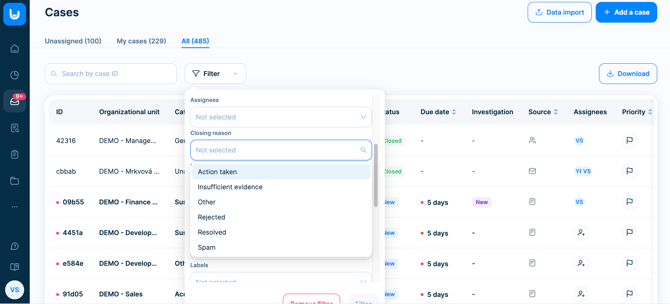
This is particularly useful if you want to analyze, for example:
- Substantiated vs. unsubstantiated cases
- Policy breaches vs. misunderstandings
- Cases resolved through mediation vs. disciplinary action
---
### Closing reasons in Analytics
In the **Analytics** section, you’ll find a visual chart displaying case distribution by closing reason.
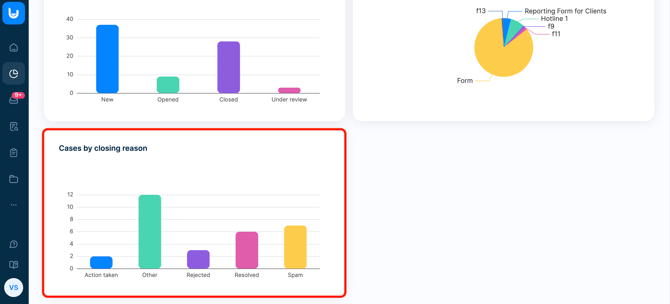
This allows you to:
- Quickly understand resolution trends
- Share high-level summaries with leadership
- Identify recurring compliance risks
- Spot areas where additional training or policy updates may be needed
---
### Why closing reasons matter
For compliance and ethics leaders, closing a case is more than an administrative action - it’s a signal.
Clearly defined closing reasons help you:
- Maintain consistent case documentation across your team
- Ensure audit-readiness and defensibility
- Identify patterns in resolution types
- Track how issues are handled over time
- Improve reporting to leadership and the board
Instead of simply marking a case as *closed*, you create structured insight into *how* and *why* it was resolved.
---
### Best practice for compliance teams
We recommend:
- Defining clear internal guidelines for selecting closing reasons
- Keeping closing comments factual and audit-ready
- Reviewing closing-reason analytics quarterly
- Aligning resolution categories with your compliance reporting framework
When used consistently, closing reasons turn your case management process into a strategic compliance asset - not just a record-keeping tool.
- [General](https://support.faceup.com/general?hsLang=en)
- [Administration features](https://support.faceup.com/administration-features?hsLang=en#main-content)
- [Managing cases](https://support.faceup.com/administration-features?hsLang=en#managing-cases)
- [Investigations](https://support.faceup.com/administration-features?hsLang=en#investigations)
- [Managing members](https://support.faceup.com/administration-features?hsLang=en#managing-members)
- [Settings](https://support.faceup.com/administration-features?hsLang=en#settings)
- [Channels](https://support.faceup.com/channels?hsLang=en#main-content)
- [Form](https://support.faceup.com/channels?hsLang=en#form)
- [Automated hotline](https://support.faceup.com/channels?hsLang=en#automated-hotline)
- [AI-powered Hotline](https://support.faceup.com/channels?hsLang=en#ai-powered-hotline)
- [Live hotline](https://support.faceup.com/channels?hsLang=en#live-hotline)
- [Survey](https://support.faceup.com/channels?hsLang=en#survey)
- [Integrations](https://support.faceup.com/integrations?hsLang=en#main-content)
- [HR Systems & Employee Sync](https://support.faceup.com/integrations?hsLang=en#hr-systems-employee-sync)
- [Notifications & Communication Tools](https://support.faceup.com/integrations?hsLang=en#notifications-communication-tools)
- [Automation & Workflow Tools](https://support.faceup.com/integrations?hsLang=en#automation-workflow-tools)
- [API & Advanced Integrations](https://support.faceup.com/integrations?hsLang=en#api-advanced-integrations)
- [Compliance & GRC Tools](https://support.faceup.com/integrations?hsLang=en#compliance-grc-tools)
- [Privacy & Security](https://support.faceup.com/privacy-security?hsLang=en)
- [Partner administration](https://support.faceup.com/partner-administration?hsLang=en)
[](https://www.faceup.com/en)
FaceUp Technology © 2025