
Note: The emergency phone number functionality is currently in its final refinement stage. While fully available, it may not perform consistently in all scenarios yet. Ongoing improvements are in progress, and an updated version will be released soon.
How the Emergency Escalation Feature Works
The emergency escalation feature helps organizations respond faster to situations involving immediate and serious safety risks.
When the system detects and confirms imminent danger:
• A notification (SMS) is sent to a designated emergency contact within the organization
• The reporter is informed that emergency escalation has been triggered and that a notification was sent to a designated contact within the company
This feature is designed as an internal notification mechanism. It is a notification tool only and does not provide emergency management, crisis intervention, or safety coordination.
It does not contact external emergency services and does not replace standard emergency response procedures. It is triggered only in situations involving imminent danger, not past events.
Organizations can configure an emergency phone number directly in the FaceUp administration. Go to Channels Overview, open the specific AI Hotline channel, and add the emergency contact number.
This feature is optional and fully controlled by the organization.
If no emergency number is configured, all situations — including those involving immediate danger — will be handled as standard reports without emergency escalation.
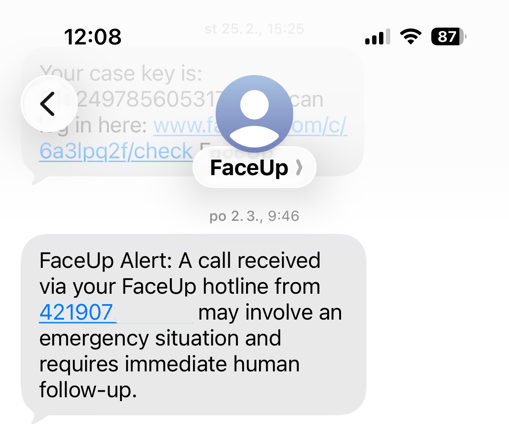
When Emergency Escalation Is Triggered
Emergency escalation is activated only when the caller clearly describes an immediate risk of serious harm, such as:
• Stating intent to harm themselves right now
• Describing someone actively threatening or attacking another person
• Situations involving immediate danger to life or risk of severe injury
If the situation is unclear (for example, “people are fighting”), the AI may ask one clarifying question:
“Is anyone in immediate danger right now?”
Past incidents that are no longer ongoing do not trigger emergency escalation.
Detection is based on clear and explicit language indicating imminent harm.
Reporter Confirmation & Consent
In most situations, the caller is asked to confirm before the emergency notification is sent.
If the caller declines:
• No emergency notification is sent
• The report continues through the standard reporting process
• You will receive a case in your administration
This ensures the feature respects the caller’s choice while maintaining documentation.
What Happens After Escalation
If emergency escalation is confirmed:
• The designated internal emergency contact is notified via text message
• The organization is responsible for any further action
The AI Hotline remains a reporting tool and does not replace internal emergency procedures.
Each organization is responsible for:
• Deciding if to use this feature & defining an appropriate emergency contact
• Monitoring that contact
• Ensuring internal response processes are in place
Important Limitations
The emergency escalation feature:
• Is not a crisis hotline
• Does not replace local emergency services
• Does not guarantee physical intervention
• Does not guarantee response time
• May not detect all high-risk or emotionally intense situations
• Relies on clear and explicit descriptions of immediate danger
The feature is powered by advanced AI language models that interpret spoken language. While designed for high accuracy, AI systems may occasionally misunderstand context or phrasing.
Indirect or vague statements such as:
• “I can’t take this anymore”
• “Things are bad”
• “I feel overwhelmed”
will not trigger escalation unless immediate danger is clearly stated.
Responsibility & Proper Use
The AI Hotline is a reporting tool that includes an optional internal emergency notification feature.
It should not be used as the organization’s only emergency response system.
The organization remains fully responsible for:
• Emergency response policies
• Internal safety procedures
• Monitoring emergency notifications
• Determining how and when intervention occurs
The emergency escalation feature supports identifying emergency situations and internal response — it does not replace it.