---
title: How to access client administration
description: Log in to your partner administration. Click on the Organization icon in the side navigation bar to be redirected to your clients overview. Then click on the row with the name of the organization you want to join.
---
[Skip to content](https://support.faceup.com/how-to-access-client-administration#main-content)
- [English](https://support.faceup.com/how-to-access-client-administration)
- [Čeština](https://support.faceup.com/cs/jak-vstoupit-do-administrace-klienta)
English
Show submenu for translations
[Contact Support](https://support.faceup.com/kb-tickets/new?hsLang=en)
[](https://www.faceup.com/en)
- [Help center](https://support.faceup.com/en)
- [System status](https://status.faceup.com/)
- [Trust Center](https://trust.faceup.com/)
Open main navigation
Close main navigation
- [Help center](https://support.faceup.com/en)
- [System status](https://status.faceup.com/)
- [Trust Center](https://trust.faceup.com/)
- - [English](https://support.faceup.com/how-to-access-client-administration)
- [Čeština](https://support.faceup.com/cs/jak-vstoupit-do-administrace-klienta)
English
Show submenu for translations
- [Contact Support](https://support.faceup.com/kb-tickets/new)
- [Sign In](https://www.admin.faceup.com/)
[Sign In](https://www.admin.faceup.com/)
How can we help you?
- There are no suggestions because the search field is empty.
1. [FaceUp Help Center](https://support.faceup.com/?hsLang=en)
2. [Partner administration](https://support.faceup.com/partner-administration?hsLang=en)
# How to access client administration
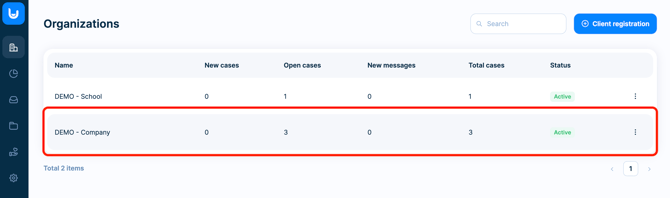
Log in to your partner administration. On the **Organizations** page **click on the row with the name** of the organization you want to join.
If you want to **leave the client administration**, click the **Go back to partner administration** option which you will always find in the top bar.

- [General](https://support.faceup.com/general?hsLang=en)
- [Administration features](https://support.faceup.com/administration-features?hsLang=en#main-content)
- [Managing cases](https://support.faceup.com/administration-features?hsLang=en#managing-cases)
- [Investigations](https://support.faceup.com/administration-features?hsLang=en#investigations)
- [Managing members](https://support.faceup.com/administration-features?hsLang=en#managing-members)
- [Settings](https://support.faceup.com/administration-features?hsLang=en#settings)
- [Channels](https://support.faceup.com/channels?hsLang=en#main-content)
- [Form](https://support.faceup.com/channels?hsLang=en#form)
- [Automated hotline](https://support.faceup.com/channels?hsLang=en#automated-hotline)
- [AI-powered Hotline](https://support.faceup.com/channels?hsLang=en#ai-powered-hotline)
- [Live hotline](https://support.faceup.com/channels?hsLang=en#live-hotline)
- [Survey](https://support.faceup.com/channels?hsLang=en#survey)
- [Integrations](https://support.faceup.com/integrations?hsLang=en#main-content)
- [HR Systems & Employee Sync](https://support.faceup.com/integrations?hsLang=en#hr-systems-employee-sync)
- [Notifications & Communication Tools](https://support.faceup.com/integrations?hsLang=en#notifications-communication-tools)
- [Automation & Workflow Tools](https://support.faceup.com/integrations?hsLang=en#automation-workflow-tools)
- [API & Advanced Integrations](https://support.faceup.com/integrations?hsLang=en#api-advanced-integrations)
- [Compliance & GRC Tools](https://support.faceup.com/integrations?hsLang=en#compliance-grc-tools)
- [Privacy & Security](https://support.faceup.com/privacy-security?hsLang=en)
- [Partner administration](https://support.faceup.com/partner-administration?hsLang=en)
[](https://www.faceup.com/en)
FaceUp Technology © 2025