---
title: Investigations overview
description: All investigations are accessible in a dedicated section in your FaceUp administration.
---
[Skip to content](https://support.faceup.com/investigations-overview#main-content)
- [English](https://support.faceup.com/investigations-overview)
- [Čeština](https://support.faceup.com/cs/investigations-overview)
English
Show submenu for translations
[Contact Support](https://support.faceup.com/kb-tickets/new?hsLang=en)
[](https://www.faceup.com/en)
- [Help center](https://support.faceup.com/en)
- [System status](https://status.faceup.com/)
- [Trust Center](https://trust.faceup.com/)
Open main navigation
Close main navigation
- [Help center](https://support.faceup.com/en)
- [System status](https://status.faceup.com/)
- [Trust Center](https://trust.faceup.com/)
- - [English](https://support.faceup.com/investigations-overview)
- [Čeština](https://support.faceup.com/cs/investigations-overview)
English
Show submenu for translations
- [Contact Support](https://support.faceup.com/kb-tickets/new)
- [Sign In](https://www.admin.faceup.com/)
[Sign In](https://www.admin.faceup.com/)
How can we help you?
- There are no suggestions because the search field is empty.
1. [FaceUp Help Center](https://support.faceup.com/?hsLang=en)
2. [Administration features](https://support.faceup.com/administration-features?hsLang=en)
3. [Investigations](https://support.faceup.com/administration-features?hsLang=en#investigations)
# Investigations overview
## All investigations are accessible in a dedicated section in your FaceUp administration.
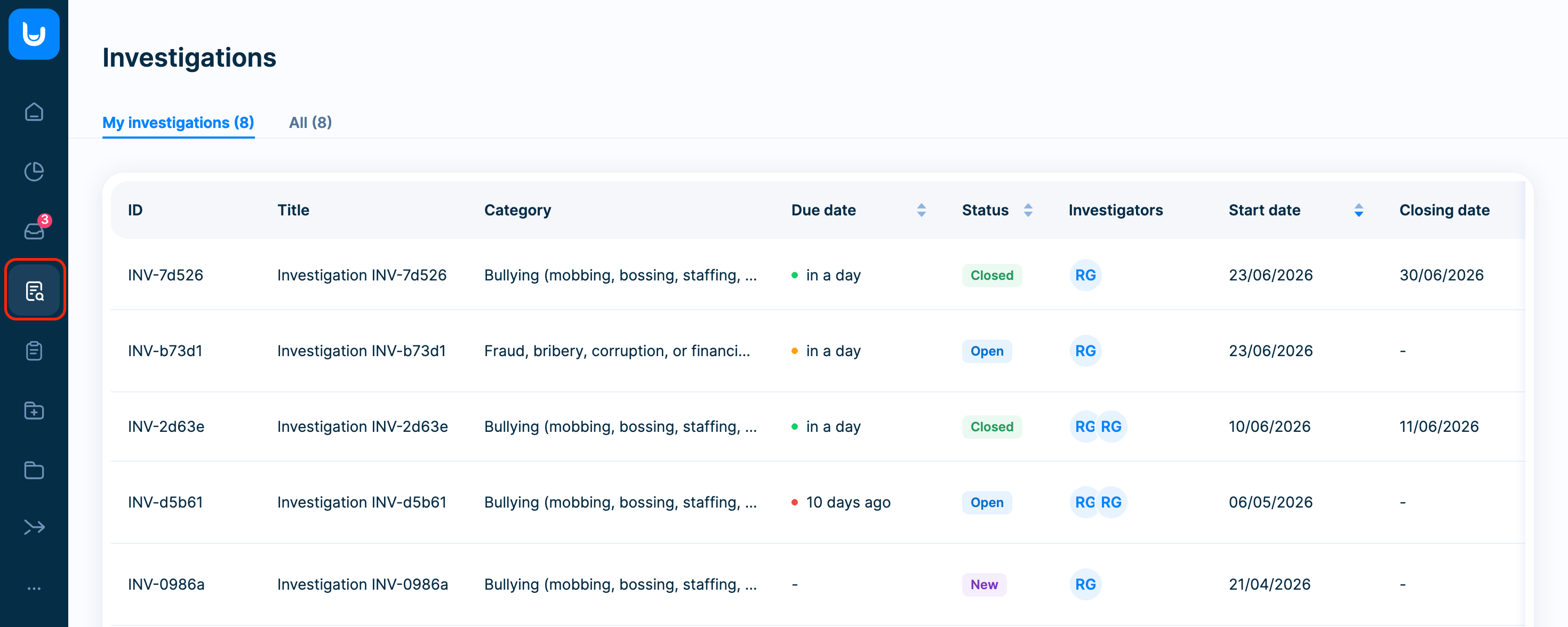
### **What you’ll see**
- Investigation ID and title
- Category
- Status
- Assigned investigators
- Start date, due date, and closing date
### **Key behaviors**
- Investigations are sorted by start date by default, but you can easily change the sorting based on any column.
- Only users with investigation permissions can access this section.
- All investigators can see the list of investigations.
- **Only assigned investigators can open and view the details of a specific investigation.**
### **Status logic**
Each investigation has 3 statuses:
- **New** – the investigation has been created but has not yet been started
- **Open** – the investigation is in progress (set automatically once changes are made)
- **Closed** – the investigation is completed and can no longer be edited
### **Setting up notifications**
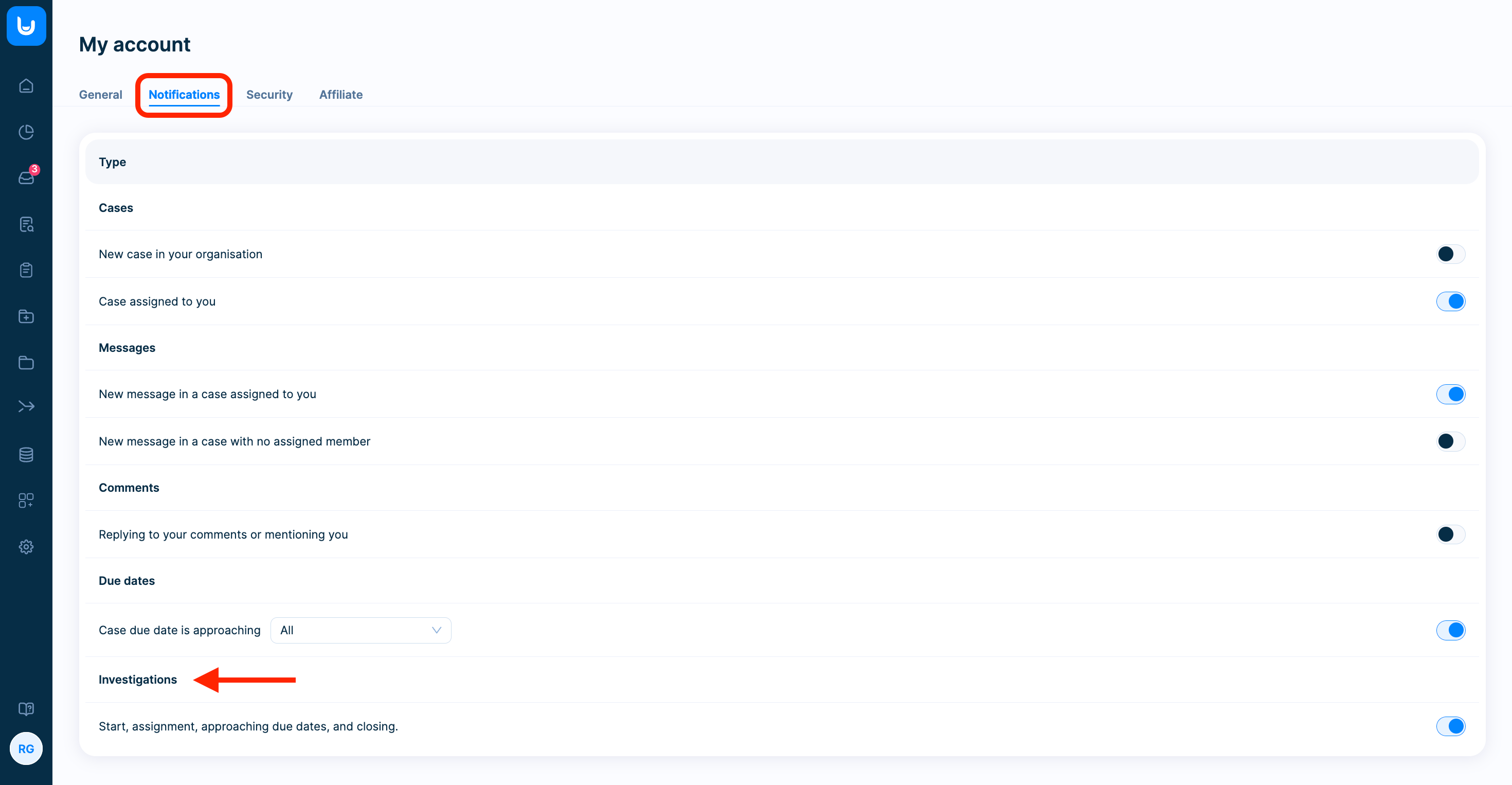
FaceUp automatically notifies relevant stakeholders by email. Notification preferences can be managed in Personal Settings under Notifications.
The following notifications are available:
- Investigation started
- Investigator assigned
- Due date reminder
- Investigation closed
- [General](https://support.faceup.com/general?hsLang=en)
- [Administration features](https://support.faceup.com/administration-features?hsLang=en#main-content)
- [Managing cases](https://support.faceup.com/administration-features?hsLang=en#managing-cases)
- [Investigations](https://support.faceup.com/administration-features?hsLang=en#investigations)
- [Managing members](https://support.faceup.com/administration-features?hsLang=en#managing-members)
- [Settings](https://support.faceup.com/administration-features?hsLang=en#settings)
- [Channels](https://support.faceup.com/channels?hsLang=en#main-content)
- [Form](https://support.faceup.com/channels?hsLang=en#form)
- [Automated hotline](https://support.faceup.com/channels?hsLang=en#automated-hotline)
- [AI-powered Hotline](https://support.faceup.com/channels?hsLang=en#ai-powered-hotline)
- [Live hotline](https://support.faceup.com/channels?hsLang=en#live-hotline)
- [Survey](https://support.faceup.com/channels?hsLang=en#survey)
- [Integrations](https://support.faceup.com/integrations?hsLang=en#main-content)
- [HR Systems & Employee Sync](https://support.faceup.com/integrations?hsLang=en#hr-systems-employee-sync)
- [Notifications & Communication Tools](https://support.faceup.com/integrations?hsLang=en#notifications-communication-tools)
- [Automation & Workflow Tools](https://support.faceup.com/integrations?hsLang=en#automation-workflow-tools)
- [API & Advanced Integrations](https://support.faceup.com/integrations?hsLang=en#api-advanced-integrations)
- [Compliance & GRC Tools](https://support.faceup.com/integrations?hsLang=en#compliance-grc-tools)
- [Privacy & Security](https://support.faceup.com/privacy-security?hsLang=en)
- [Partner administration](https://support.faceup.com/partner-administration?hsLang=en)
[](https://www.faceup.com/en)
FaceUp Technology © 2025