---
title: Linking cases
description: Linking cases is a feature designed to help you manage situations where multiple cases relate to the same underlying problem. Instead of merging cases, this feature allows you to create a visible connection between them, helping your team maintain clarity while avoiding duplication.
---
[Skip to content](https://support.faceup.com/linking-cases#main-content)
- [English](https://support.faceup.com/linking-cases)
- [Čeština](https://support.faceup.com/cs/souvisejici-podnety)
English
Show submenu for translations
[Contact Support](https://support.faceup.com/kb-tickets/new?hsLang=en)
[](https://www.faceup.com/en)
- [Help center](https://support.faceup.com/en)
- [System status](https://status.faceup.com/)
- [Trust Center](https://trust.faceup.com/)
Open main navigation
Close main navigation
- [Help center](https://support.faceup.com/en)
- [System status](https://status.faceup.com/)
- [Trust Center](https://trust.faceup.com/)
- - [English](https://support.faceup.com/linking-cases)
- [Čeština](https://support.faceup.com/cs/souvisejici-podnety)
English
Show submenu for translations
- [Contact Support](https://support.faceup.com/kb-tickets/new)
- [Sign In](https://www.admin.faceup.com/)
[Sign In](https://www.admin.faceup.com/)
How can we help you?
- There are no suggestions because the search field is empty.
1. [FaceUp Help Center](https://support.faceup.com/?hsLang=en)
2. [Administration features](https://support.faceup.com/administration-features?hsLang=en)
3. [Managing cases](https://support.faceup.com/administration-features?hsLang=en#managing-cases)
# Linking cases
## Linking cases is a feature designed to help you manage situations where multiple cases relate to the same underlying problem. Instead of merging cases, this feature allows you to create a visible connection between them, helping your team maintain clarity while avoiding duplication.
### What you can do
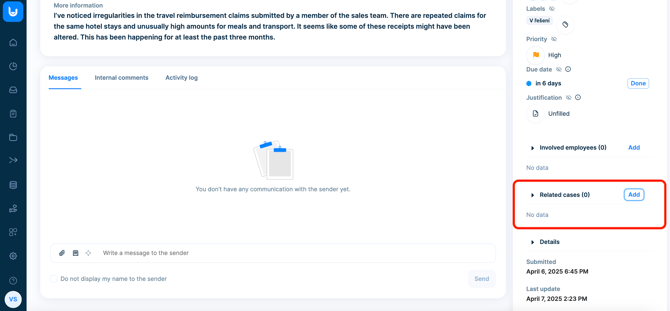
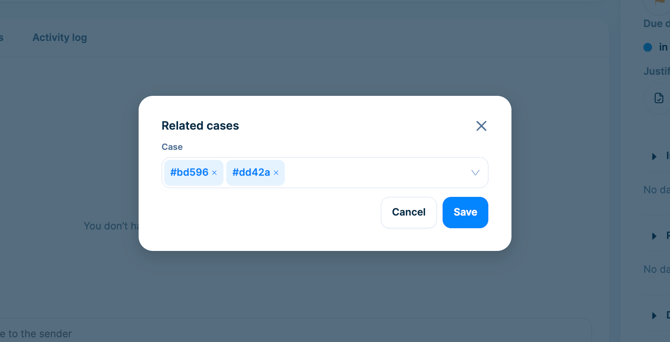
- **Manually link related cases** that are part of the same issue.
- **Maintain separation** between cases - they are *not merged* or combined.
- **Use case IDs** (e.g., `#cd07c`) to search and link relevant cases.
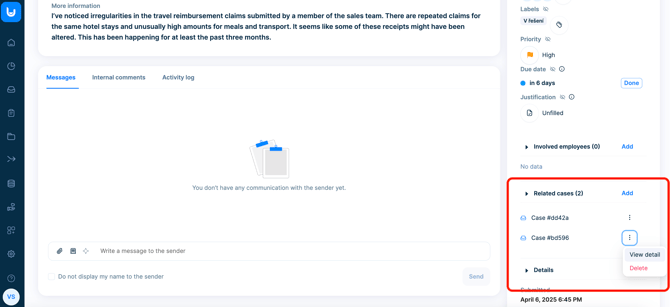
- **View linked cases** directly in the case detail view.
### Who can use it?
Only members with the **"Manage cases"** permission can link cases.
### How linking works
- **Bidirectional connection**: If Case A is linked to Case B, Case B also shows a link to Case A.
- **One-time link**: A specific case can only be linked once to another case - no duplicate links.
- **Multiple links**: One case can be linked to *several* others, enabling flexible network-style relationships.
### Where to find linked cases
All linked cases are displayed in the **case detail** section, so your team members can easily understand connections at a glance.
- [General](https://support.faceup.com/general?hsLang=en)
- [Administration features](https://support.faceup.com/administration-features?hsLang=en#main-content)
- [Managing cases](https://support.faceup.com/administration-features?hsLang=en#managing-cases)
- [Investigations](https://support.faceup.com/administration-features?hsLang=en#investigations)
- [Managing members](https://support.faceup.com/administration-features?hsLang=en#managing-members)
- [Settings](https://support.faceup.com/administration-features?hsLang=en#settings)
- [Channels](https://support.faceup.com/channels?hsLang=en#main-content)
- [Form](https://support.faceup.com/channels?hsLang=en#form)
- [Automated hotline](https://support.faceup.com/channels?hsLang=en#automated-hotline)
- [AI-powered Hotline](https://support.faceup.com/channels?hsLang=en#ai-powered-hotline)
- [Live hotline](https://support.faceup.com/channels?hsLang=en#live-hotline)
- [Survey](https://support.faceup.com/channels?hsLang=en#survey)
- [Integrations](https://support.faceup.com/integrations?hsLang=en#main-content)
- [HR Systems & Employee Sync](https://support.faceup.com/integrations?hsLang=en#hr-systems-employee-sync)
- [Notifications & Communication Tools](https://support.faceup.com/integrations?hsLang=en#notifications-communication-tools)
- [Automation & Workflow Tools](https://support.faceup.com/integrations?hsLang=en#automation-workflow-tools)
- [API & Advanced Integrations](https://support.faceup.com/integrations?hsLang=en#api-advanced-integrations)
- [Compliance & GRC Tools](https://support.faceup.com/integrations?hsLang=en#compliance-grc-tools)
- [Privacy & Security](https://support.faceup.com/privacy-security?hsLang=en)
- [Partner administration](https://support.faceup.com/partner-administration?hsLang=en)
[](https://www.faceup.com/en)
FaceUp Technology © 2025