---
title: Materials of partner administration
description: "This page allows you to view the materials and edit the visibility of the materials that are available to your clients in their administration.\nAt the top of the page there is a filter that allows you to search among the materials more easily and view, for example, only materials for schools, only promotional materials, etc.\nUsing the Show all materials slide button, you can view all materials - including those that are hidden from your clients."
---
[Skip to content](https://support.faceup.com/materials#main-content)
- [English](https://support.faceup.com/materials)
- [Čeština](https://support.faceup.com/cs/materialy)
English
Show submenu for translations
[Contact Support](https://support.faceup.com/kb-tickets/new?hsLang=en)
[](https://www.faceup.com/en)
- [Help center](https://support.faceup.com/en)
- [System status](https://status.faceup.com/)
- [Trust Center](https://trust.faceup.com/)
Open main navigation
Close main navigation
- [Help center](https://support.faceup.com/en)
- [System status](https://status.faceup.com/)
- [Trust Center](https://trust.faceup.com/)
- - [English](https://support.faceup.com/materials)
- [Čeština](https://support.faceup.com/cs/materialy)
English
Show submenu for translations
- [Contact Support](https://support.faceup.com/kb-tickets/new)
- [Sign In](https://www.admin.faceup.com/)
[Sign In](https://www.admin.faceup.com/)
How can we help you?
- There are no suggestions because the search field is empty.
1. [FaceUp Help Center](https://support.faceup.com/?hsLang=en)
2. [Partner administration](https://support.faceup.com/partner-administration?hsLang=en)
# Materials of partner administration
## This page allows you to view the materials and edit the visibility of the materials that are available to your clients in their administration.
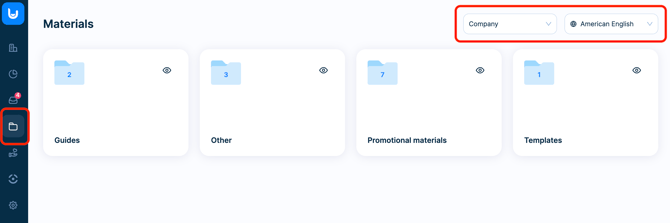
At the top of the page, there is a **filter** that allows you to switch between materials for companies and schools and their language variants.
### How to hide material
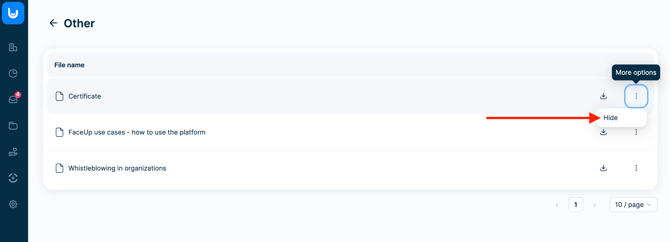
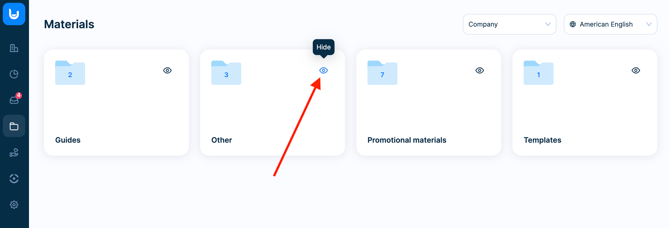
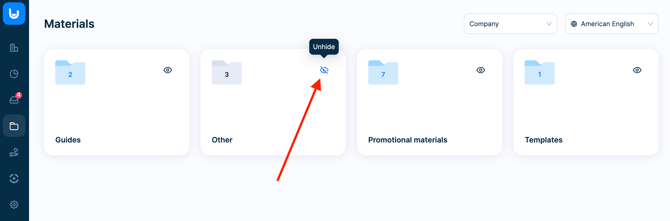
If you do not want certain materials to be displayed to your clients, you can simply hide them. You can hide either individual materials using the **Hide** option under the three dots icon at the end of the line with the material, or you can hide entire folders with materials by clicking on the **eye icon**.
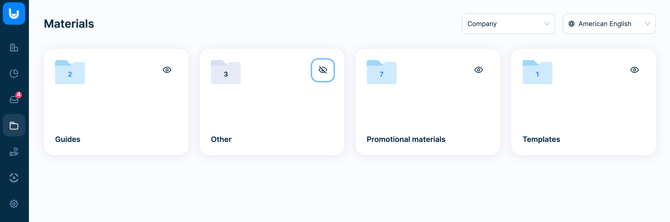
Materials or folders that are hidden have a **crossed-out eye icon** next to them.
### How to make material visible
You can make hidden material visible to your clients again. For folders that are completely hidden, you will see a **crossed-out eye icon**. Simply click on this icon to make them visible again.
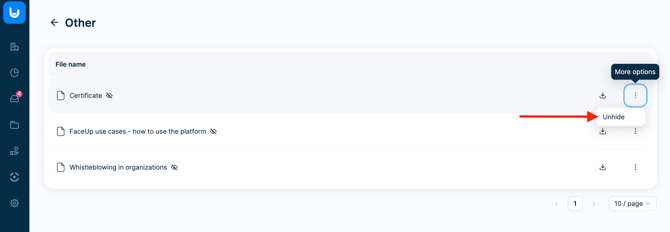
If you want to display only individual materials, click on the **Unhide** option under the three dots icon at the end of the line with the material.
- [General](https://support.faceup.com/general?hsLang=en)
- [Administration features](https://support.faceup.com/administration-features?hsLang=en#main-content)
- [Managing cases](https://support.faceup.com/administration-features?hsLang=en#managing-cases)
- [Investigations](https://support.faceup.com/administration-features?hsLang=en#investigations)
- [Managing members](https://support.faceup.com/administration-features?hsLang=en#managing-members)
- [Settings](https://support.faceup.com/administration-features?hsLang=en#settings)
- [Channels](https://support.faceup.com/channels?hsLang=en#main-content)
- [Form](https://support.faceup.com/channels?hsLang=en#form)
- [Automated hotline](https://support.faceup.com/channels?hsLang=en#automated-hotline)
- [AI-powered Hotline](https://support.faceup.com/channels?hsLang=en#ai-powered-hotline)
- [Live hotline](https://support.faceup.com/channels?hsLang=en#live-hotline)
- [Survey](https://support.faceup.com/channels?hsLang=en#survey)
- [Integrations](https://support.faceup.com/integrations?hsLang=en#main-content)
- [HR Systems & Employee Sync](https://support.faceup.com/integrations?hsLang=en#hr-systems-employee-sync)
- [Notifications & Communication Tools](https://support.faceup.com/integrations?hsLang=en#notifications-communication-tools)
- [Automation & Workflow Tools](https://support.faceup.com/integrations?hsLang=en#automation-workflow-tools)
- [API & Advanced Integrations](https://support.faceup.com/integrations?hsLang=en#api-advanced-integrations)
- [Compliance & GRC Tools](https://support.faceup.com/integrations?hsLang=en#compliance-grc-tools)
- [Privacy & Security](https://support.faceup.com/privacy-security?hsLang=en)
- [Partner administration](https://support.faceup.com/partner-administration?hsLang=en)
[](https://www.faceup.com/en)
FaceUp Technology © 2025