---
title: My account
description: You can access your account settings via the icon with your initials in the bottom left, where you can select My Account from the menu.
---
[Skip to content](https://support.faceup.com/my-account#main-content)
- [English](https://support.faceup.com/my-account)
- [Čeština](https://support.faceup.com/cs/muj-ucet)
English
Show submenu for translations
[Contact Support](https://support.faceup.com/kb-tickets/new?hsLang=en)
[](https://www.faceup.com/en)
- [Help center](https://support.faceup.com/en)
- [System status](https://status.faceup.com/)
- [Trust Center](https://trust.faceup.com/)
Open main navigation
Close main navigation
- [Help center](https://support.faceup.com/en)
- [System status](https://status.faceup.com/)
- [Trust Center](https://trust.faceup.com/)
- - [English](https://support.faceup.com/my-account)
- [Čeština](https://support.faceup.com/cs/muj-ucet)
English
Show submenu for translations
- [Contact Support](https://support.faceup.com/kb-tickets/new)
- [Sign In](https://www.admin.faceup.com/)
[Sign In](https://www.admin.faceup.com/)
How can we help you?
- There are no suggestions because the search field is empty.
1. [FaceUp Help Center](https://support.faceup.com/?hsLang=en)
2. [Administration features](https://support.faceup.com/administration-features?hsLang=en)
3. [Settings](https://support.faceup.com/administration-features?hsLang=en#settings)
# My account
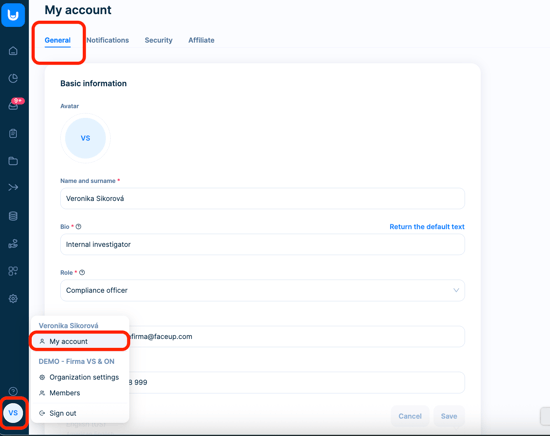
You can access your account settings via the **icon with your initials in the bottom left**, where you can select *My Account* from the menu.
### General
The *General* page is where you make the basic settings for your personal account. Here you can **upload a profile photo**, edit your **first and last name** and [bio](https://support.faceup.com/en/show-edit-report-recipients?hsLang=en), change the **email address** you use to log into your account, change your **phone number**, or set the **language** of your administration.
### Notifications
In the *Notifications* tab, you can change the settings for the [**notifications**](https://support.faceup.com/en/email-notifications?hsLang=en) we send you in response to certain events and activities.
### Security
Use the *Security* page to change your [**password**](https://support.faceup.com/change-or-reset-the-password?hsLang=en), enable/disable [**two-factor authentication**](https://support.faceup.com/multi-factor-authentication?hsLang=en) and, if you use [end-to-end encryption](https://support.faceup.com/en/encryption?hsLang=en), download a **recovery key** to reset your account.
### Affiliate
On the last *Affiliate* page you will find a link and more information on our **referral program**.
- [General](https://support.faceup.com/general?hsLang=en)
- [Administration features](https://support.faceup.com/administration-features?hsLang=en#main-content)
- [Managing cases](https://support.faceup.com/administration-features?hsLang=en#managing-cases)
- [Investigations](https://support.faceup.com/administration-features?hsLang=en#investigations)
- [Managing members](https://support.faceup.com/administration-features?hsLang=en#managing-members)
- [Settings](https://support.faceup.com/administration-features?hsLang=en#settings)
- [Channels](https://support.faceup.com/channels?hsLang=en#main-content)
- [Form](https://support.faceup.com/channels?hsLang=en#form)
- [Automated hotline](https://support.faceup.com/channels?hsLang=en#automated-hotline)
- [AI-powered Hotline](https://support.faceup.com/channels?hsLang=en#ai-powered-hotline)
- [Live hotline](https://support.faceup.com/channels?hsLang=en#live-hotline)
- [Survey](https://support.faceup.com/channels?hsLang=en#survey)
- [Integrations](https://support.faceup.com/integrations?hsLang=en#main-content)
- [HR Systems & Employee Sync](https://support.faceup.com/integrations?hsLang=en#hr-systems-employee-sync)
- [Notifications & Communication Tools](https://support.faceup.com/integrations?hsLang=en#notifications-communication-tools)
- [Automation & Workflow Tools](https://support.faceup.com/integrations?hsLang=en#automation-workflow-tools)
- [API & Advanced Integrations](https://support.faceup.com/integrations?hsLang=en#api-advanced-integrations)
- [Compliance & GRC Tools](https://support.faceup.com/integrations?hsLang=en#compliance-grc-tools)
- [Privacy & Security](https://support.faceup.com/privacy-security?hsLang=en)
- [Partner administration](https://support.faceup.com/partner-administration?hsLang=en)
[](https://www.faceup.com/en)
FaceUp Technology © 2025