---
title: Reporting via AI-powered Hotline (Caller Experience)
description: Learn how reporting via the AI-powered Hotline works, from the caller experience to submitting a report and receiving a secure case key.
---
[Skip to content](https://support.faceup.com/reporting-via-ai-powered-hotline-caller-experience#main-content)
English
Show submenu for translations
[Contact Support](https://support.faceup.com/kb-tickets/new?hsLang=en)
[](https://www.faceup.com/en)
- [Help center](https://support.faceup.com/en)
- [System status](https://status.faceup.com/)
- [Trust Center](https://trust.faceup.com/)
Open main navigation
Close main navigation
- [Help center](https://support.faceup.com/en)
- [System status](https://status.faceup.com/)
- [Trust Center](https://trust.faceup.com/)
- English
Show submenu for translations
- [Contact Support](https://support.faceup.com/kb-tickets/new)
- [Sign In](https://www.admin.faceup.com/)
[Sign In](https://www.admin.faceup.com/)
How can we help you?
- There are no suggestions because the search field is empty.
1. [FaceUp Help Center](https://support.faceup.com/?hsLang=en)
2. [Channels](https://support.faceup.com/channels?hsLang=en)
3. [AI-powered Hotline](https://support.faceup.com/channels?hsLang=en#ai-powered-hotline)
# Reporting via AI-powered Hotline (Caller Experience)
This article briefly explains what reporters experience when using the AI-Powered Hotline.
The reporting process is designed to be simple, confidential, effective, and comfortable.
The conversation flow is carefully designed to gather all necessary details while not overwhelming callers with too many questions. A typical call takes approximately 2–4 minutes.
🎥 A short video demonstration of the experience is available below.
### How the Call Works
When a reporter calls the AI-powered Hotline:
• The AI voice agent greets the caller and explains confidentiality, states that it is an AI system, and informs them that the call will be recorded. It then prompts the reporter to describe what happened.
• The caller can describe the situation naturally, without forms or menu navigation.
• The AI agent guides the conversation calmly and asks relevant follow-up questions when needed.
• The reporter speaks freely in their own words.
The conversation is structured yet natural — similar to speaking with a trained hotline operator. The AI voice agent asks a few follow-up questions, then confirms that the report has been submitted and explains the next steps.
### Anonymity Options
Reporters can choose whether to remain anonymous.
If anonymity is selected:
• The voice recording is anonymized
• The report remains fully confidential
Reporters can still provide as much detail as they feel comfortable sharing. **The hotline is designed not to ask for the reporter’s identity** — it only asks whether they want their voice recording to be anonymized.
### Case Key & Follow-Up Link
After the call ends, the reporter receives:
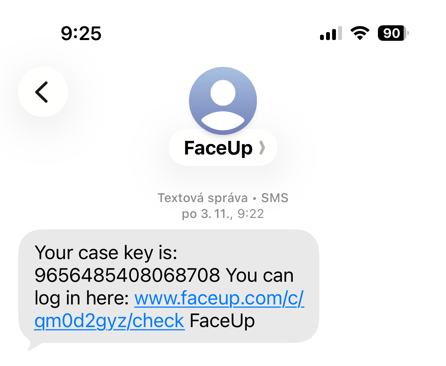
• A text message containing a secure case key
• A secure case link for checking the case and adding additional details or evidence
This allows the reporter to:
• Add more information later
• Upload supporting materials
• Communicate securely without needing to call again
### Multilingual Support
FaceUp AI-powered Hotline supports multilingual conversations.
• Each hotline number has one default language
• Reporters can switch languages at any time during the call
• The AI agent automatically adapts and continues in the selected language
No menus or manual language selection are required.
### Emergency Situations
If the caller reports an urgent situation involving immediate danger:
• The system can notify a designated emergency contact within the organization (if configured)
• The caller is informed that emergency escalation is in progress
• The call is securely ended
If an emergency phone number is not configured, the report is handled through the standard reporting process.
This helps organizations respond faster to critical situations. This is a safety feature, and each organization can decide whether to enable it based on their internal processes.
- [General](https://support.faceup.com/general?hsLang=en)
- [Administration features](https://support.faceup.com/administration-features?hsLang=en#main-content)
- [Managing cases](https://support.faceup.com/administration-features?hsLang=en#managing-cases)
- [Investigations](https://support.faceup.com/administration-features?hsLang=en#investigations)
- [Managing members](https://support.faceup.com/administration-features?hsLang=en#managing-members)
- [Settings](https://support.faceup.com/administration-features?hsLang=en#settings)
- [Channels](https://support.faceup.com/channels?hsLang=en#main-content)
- [Form](https://support.faceup.com/channels?hsLang=en#form)
- [Automated hotline](https://support.faceup.com/channels?hsLang=en#automated-hotline)
- [AI-powered Hotline](https://support.faceup.com/channels?hsLang=en#ai-powered-hotline)
- [Live hotline](https://support.faceup.com/channels?hsLang=en#live-hotline)
- [Survey](https://support.faceup.com/channels?hsLang=en#survey)
- [Integrations](https://support.faceup.com/integrations?hsLang=en#main-content)
- [HR Systems & Employee Sync](https://support.faceup.com/integrations?hsLang=en#hr-systems-employee-sync)
- [Notifications & Communication Tools](https://support.faceup.com/integrations?hsLang=en#notifications-communication-tools)
- [Automation & Workflow Tools](https://support.faceup.com/integrations?hsLang=en#automation-workflow-tools)
- [API & Advanced Integrations](https://support.faceup.com/integrations?hsLang=en#api-advanced-integrations)
- [Compliance & GRC Tools](https://support.faceup.com/integrations?hsLang=en#compliance-grc-tools)
- [Privacy & Security](https://support.faceup.com/privacy-security?hsLang=en)
- [Partner administration](https://support.faceup.com/partner-administration?hsLang=en)
[](https://www.faceup.com/en)
FaceUp Technology © 2025
```json
{
"@context" : "https://schema.org",
"@type" : "VideoObject",
"caption" : {
"@type" : "MediaObject",
"contentUrl" : "https://support.faceup.com/media-transcripts/383223243997/en.vtt",
"inLanguage" : "en",
"name" : "en Captions"
},
"contentUrl" : "https://26763534.fs1.hubspotusercontent-eu1.net/hubfs/26763534/video_assets/383223243997/inherited/web_optimized.mp4",
"dateModified" : "2026-03-25T08:21:21.160Z",
"duration" : "PT5M21.655S",
"height" : 1080,
"name" : "AI-powered Hotline video",
"thumbnailUrl" : "https://26763534.fs1.hubspotusercontent-eu1.net/hubfs/26763534/AI-powered%20Hotline%20video.mp4/medium.jpg",
"uploadDate" : "2026-03-25T08:15:49.072Z",
"width" : 1920
}
```