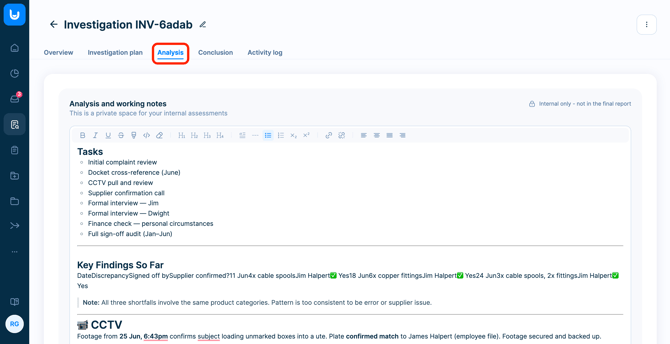
Starting an investigation opens a separate workspace, accessible only to users with investigation permissions.
The workspace is organized into five main tabs:
- Overview
- Investigation plan
- Analysis
- Conclusion
- Activity log
The workflow is structured but flexible. Investigators can move freely between tabs as needed, rather than following a strict step-by-step process.
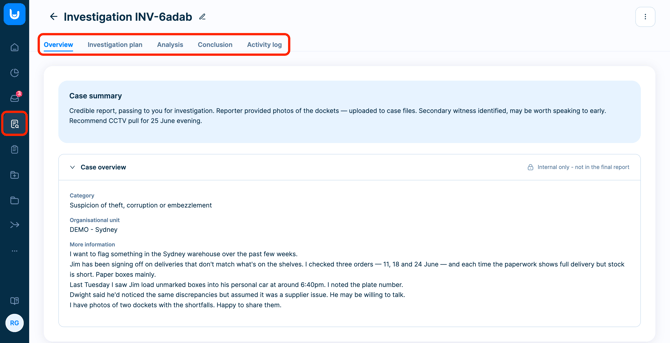
Pre-filled data from the case
To speed up the handover, FaceUp automatically copies relevant information from the case into the investigation:
- Case overview (read-only)
- Case attachments (editable)
- Investigation participants (editable)
- Category and organizational unit (editable)
Reporter identity is never copied to the investigation.
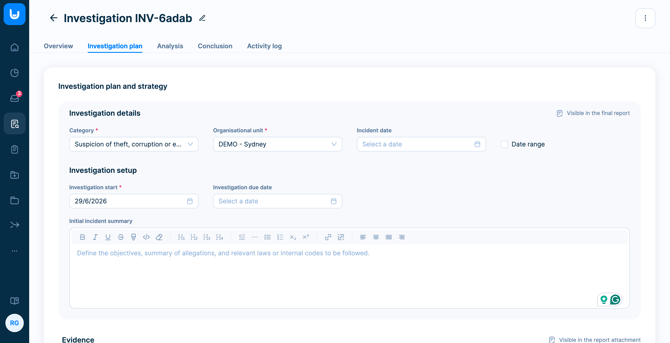
Editable investigation fields
Investigators can define and update the following at any point before closure:
- Assigned investigators
- Incident date
- Investigation start date (required)
- Due date
- Initial incident summary (objectives, summary of allegations, or relevant regulations)
All changes are tracked in the activity log. Edits can be made at any point until the investigation is closed.
Evidence collection
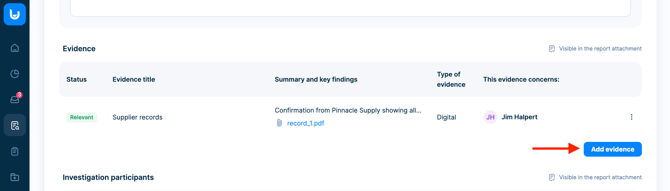
The Evidence section within the Investigation plan tab allows you to centralize all supporting materials. Evidence ensures your investigation is based on facts, not assumptions.
It creates a clear record of what was reviewed and supports your final conclusions — which is critical for audits, internal reviews, and legal defensibility.
💡 Files attached to the original case, e.g. those submitted by the reporter, are copied into the investigation as independent evidence items. From that point on, they're separate from the case: any changes made within the investigation are not synced back.
Uploading evidence
- Upload up to 50 files
- Max file size: 50 MB per file
- Add more details to each entry:
- Title (required)
- Description (optional)
- Type (Physical / Digital / Interview)
- Status (Relevant / Irrelevant)
- Whom does this evidence concern (optional)
Evidence can be logged without uploading a file.
Managing evidence
Investigators can:
- Edit evidence
- Download files
- Delete evidence (with confirmation)
All actions are tracked in the activity log.
Investigation participants
Investigators can add individuals connected to the case, define their role (subject, witness, or consultant), and include a description of their involvement or a summary of their statement.
To add participants, you need to either upload an employee list or connect your HR tool.

Analysis tab
The Analysis tab is an internal-only workspace. Its contents will not appear in the final PDF report.
Use it to capture notes, observations, and open questions as the investigation progresses. Rich text editing is available to keep notes organized.
If multiple investigators are working on a case, the Analysis tab serves as a shared space to document thinking and collaborate without it becoming part of the formal record.