---
title: Transcription (and translation) of hotline cases
description: Display a transcript of the cases received via the hotline. The text can then be translated using the built-in translation feature. This means every case, no matter the language, can be handled efficiently, ensuring seamless communication and collaboration!
---
[Skip to content](https://support.faceup.com/transcription-of-hotline-reports#main-content)
- [English](https://support.faceup.com/transcription-of-hotline-reports)
- [Čeština](https://support.faceup.com/cs/prepis-oznameni-z-telefonni-linky)
English
Show submenu for translations
[Contact Support](https://support.faceup.com/kb-tickets/new?hsLang=en)
[](https://www.faceup.com/en)
- [Help center](https://support.faceup.com/en)
- [System status](https://status.faceup.com/)
- [Trust Center](https://trust.faceup.com/)
Open main navigation
Close main navigation
- [Help center](https://support.faceup.com/en)
- [System status](https://status.faceup.com/)
- [Trust Center](https://trust.faceup.com/)
- - [English](https://support.faceup.com/transcription-of-hotline-reports)
- [Čeština](https://support.faceup.com/cs/prepis-oznameni-z-telefonni-linky)
English
Show submenu for translations
- [Contact Support](https://support.faceup.com/kb-tickets/new)
- [Sign In](https://www.admin.faceup.com/)
[Sign In](https://www.admin.faceup.com/)
How can we help you?
- There are no suggestions because the search field is empty.
1. [FaceUp Help Center](https://support.faceup.com/?hsLang=en)
2. [Channels](https://support.faceup.com/channels?hsLang=en)
3. [Automated hotline](https://support.faceup.com/channels?hsLang=en#automated-hotline)
# Transcription (and translation) of hotline cases
## Display a transcript of the cases received via the hotline. For foreign-language submissions, you can use the translation function.
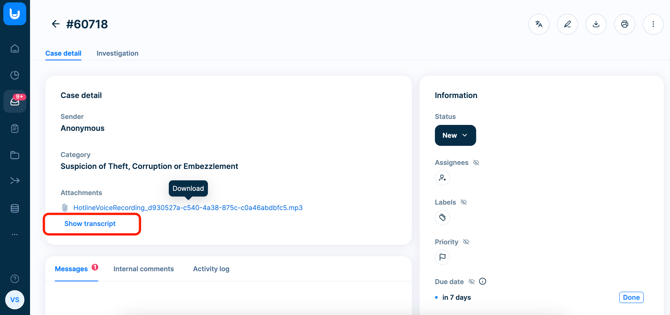
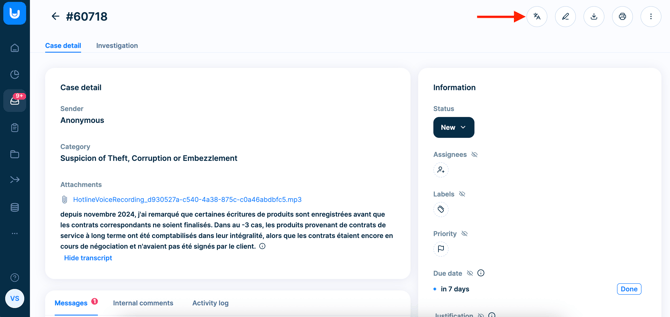
In the hotline case detail, click the *Show transcript* option. You will then see a **written transcript of the case**. You can also download the attached file with the recording by clicking on it.
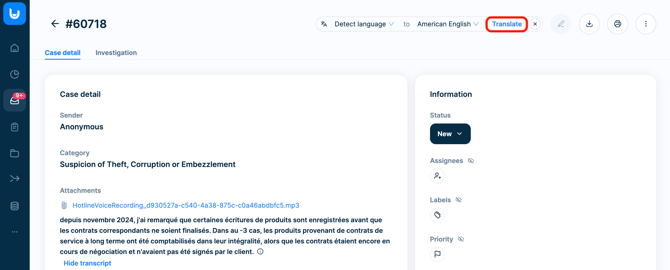
The **text can then be translated using the built-in translation feature**. This means every case, no matter the language, can be handled efficiently, ensuring seamless communication and collaboration.
- [General](https://support.faceup.com/general?hsLang=en)
- [Administration features](https://support.faceup.com/administration-features?hsLang=en#main-content)
- [Managing cases](https://support.faceup.com/administration-features?hsLang=en#managing-cases)
- [Investigations](https://support.faceup.com/administration-features?hsLang=en#investigations)
- [Managing members](https://support.faceup.com/administration-features?hsLang=en#managing-members)
- [Settings](https://support.faceup.com/administration-features?hsLang=en#settings)
- [Channels](https://support.faceup.com/channels?hsLang=en#main-content)
- [Form](https://support.faceup.com/channels?hsLang=en#form)
- [Automated hotline](https://support.faceup.com/channels?hsLang=en#automated-hotline)
- [AI-powered Hotline](https://support.faceup.com/channels?hsLang=en#ai-powered-hotline)
- [Live hotline](https://support.faceup.com/channels?hsLang=en#live-hotline)
- [Survey](https://support.faceup.com/channels?hsLang=en#survey)
- [Integrations](https://support.faceup.com/integrations?hsLang=en#main-content)
- [HR Systems & Employee Sync](https://support.faceup.com/integrations?hsLang=en#hr-systems-employee-sync)
- [Notifications & Communication Tools](https://support.faceup.com/integrations?hsLang=en#notifications-communication-tools)
- [Automation & Workflow Tools](https://support.faceup.com/integrations?hsLang=en#automation-workflow-tools)
- [API & Advanced Integrations](https://support.faceup.com/integrations?hsLang=en#api-advanced-integrations)
- [Compliance & GRC Tools](https://support.faceup.com/integrations?hsLang=en#compliance-grc-tools)
- [Privacy & Security](https://support.faceup.com/privacy-security?hsLang=en)
- [Partner administration](https://support.faceup.com/partner-administration?hsLang=en)
[](https://www.faceup.com/en)
FaceUp Technology © 2025